QR StudioQR Studio home

Free · Private · Offline

Styled QR codes, 100% offline

Add a logo, gradients and a frame, export up to 2048px as PNG, SVG, JPG or PDF — and scan codes back from any image without a camera. Nothing ever leaves your browser.

  • No account
  • No expiring links
  • No tracking

Version 0.1.0 · Chrome 88+ · Also works in Edge, Brave, Arc, Vivaldi and Opera

QR Studio — customize & export
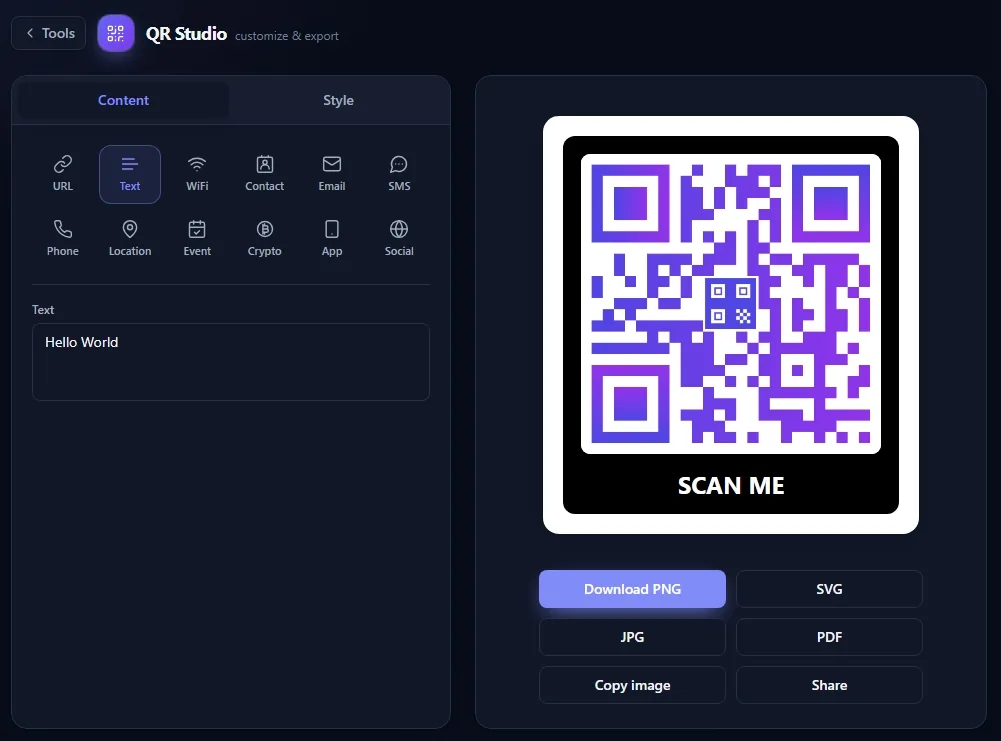
The QR Studio editor: content tab with 12 data types on the left, a purple gradient QR code with a SCAN ME frame and PNG/SVG/JPG/PDF export buttons on the right
Data types
12Data types
Export formats
4Export formats
Max resolution
2048pxMax resolution
Bytes uploaded
0Bytes uploaded

12 data types · 4 export formats · up to 2048px · 16 languages

Your QR code should not depend on someone else's server

Most online generators quietly point your code at their own short link. That gives them a scan counter — and gives you a code that can break the day their free tier ends, their domain lapses, or they decide the good export formats are a paid feature. QR Studio takes the opposite approach: the data is encoded straight into the pattern, on your machine.

Online generator

Your URL is wrapped in their short link. Scans are logged, the code can expire or be redirected, high-resolution and vector export sit behind a subscription, and whatever you typed — a Wi-Fi password, a phone number — was uploaded to a server you don't control.

QR Studio

The code is static: the data lives in the pattern itself, so it works forever and nobody counts the scans. Generation happens in your browser with no network request, and every export format — including 2048px PNG and vector SVG — is free.

Features

A full QR toolkit in your toolbar

Everything other tools charge for — logos, vectors, HD export, scanning — built in and free, because none of it costs us a server.

Design it, don't just generate it

Drop in a logo, switch the foreground to a linear or radial gradient, choose from six dot shapes and separate corner-eye styles, set the error-correction level, and wrap the whole thing in a frame with your own call-to-action text. When a logo is added the error correction is raised automatically so the code still scans.
12 kinds of QR code, not just links

URL, plain text, Wi-Fi network, vCard contact, pre-filled email, SMS, phone number, map location, calendar event, crypto payment address, smart app-store link and social profiles. Each one has proper fields, so you never have to remember the encoding format yourself.

Export that's actually usable

PNG, SVG, JPG and PDF, at any size up to 2048px, or straight to the clipboard. SVG stays sharp at billboard size; transparent backgrounds are one checkbox away.

Scan without a camera

Decode from an image file, a drag-and-drop, a clipboard paste, a capture of the whole page, or by right-clicking any image you see. Reads QR plus common 1D and 2D barcodes, and parses the result into something you can act on.

History, tags and style templates

Every code you make or scan is kept locally, searchable, taggable and starrable. Save a style you like as a template and reuse it in one click. Back everything up to a JSON file and restore it on another machine.

Two keystrokes and a right-click

Alt+Shift+Q opens QR Studio with the current page pre-filled; Alt+Shift+S jumps straight to the scanner. The right-click menu covers the page, a link, selected text, or an image to decode.

100% offline, no account

No sign-up, no network requests, no analytics SDK, no remote API. Install it, turn off your Wi-Fi, and everything still works exactly the same.

Data types

Twelve things a QR code can be

Pick a type, fill in the fields, and QR Studio builds the correctly formatted payload for you.

Every type exports to all four formats, at any size up to 2048px:

  • PNG
  • SVG
  • JPG
  • PDF

Screenshots

See it before you install it

Three surfaces: the toolbar popup for speed, the editor for control, and the tools hub for everything else.

QR Studio popup
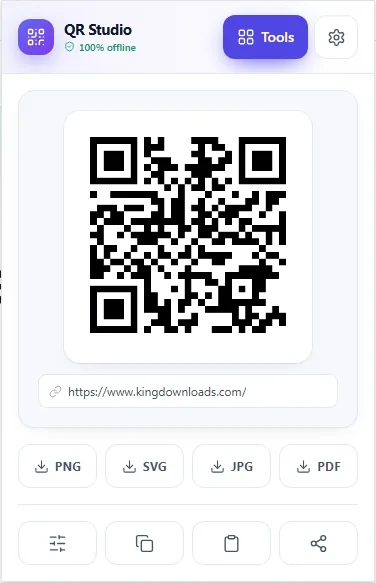
The QR Studio popup with a QR code for the current page and PNG, SVG, JPG and PDF buttons underneath

The page you're on, already encoded

Open the popup and the current tab is a QR code before you've typed anything. Download it as PNG, SVG, JPG or PDF, copy it to the clipboard, or send it into the editor to style it properly.

QR Studio — customize & export
The QR Studio editor with the content tab open, twelve data type buttons, and a purple gradient QR code with a SCAN ME frame

Content on the left, style on the right

Twelve data types across the top, the live preview beside them. Flip to the Style tab for logo, gradient, dot and corner shapes, size, margin, error correction and the frame label — the preview updates as you go.

QR Studio — tools
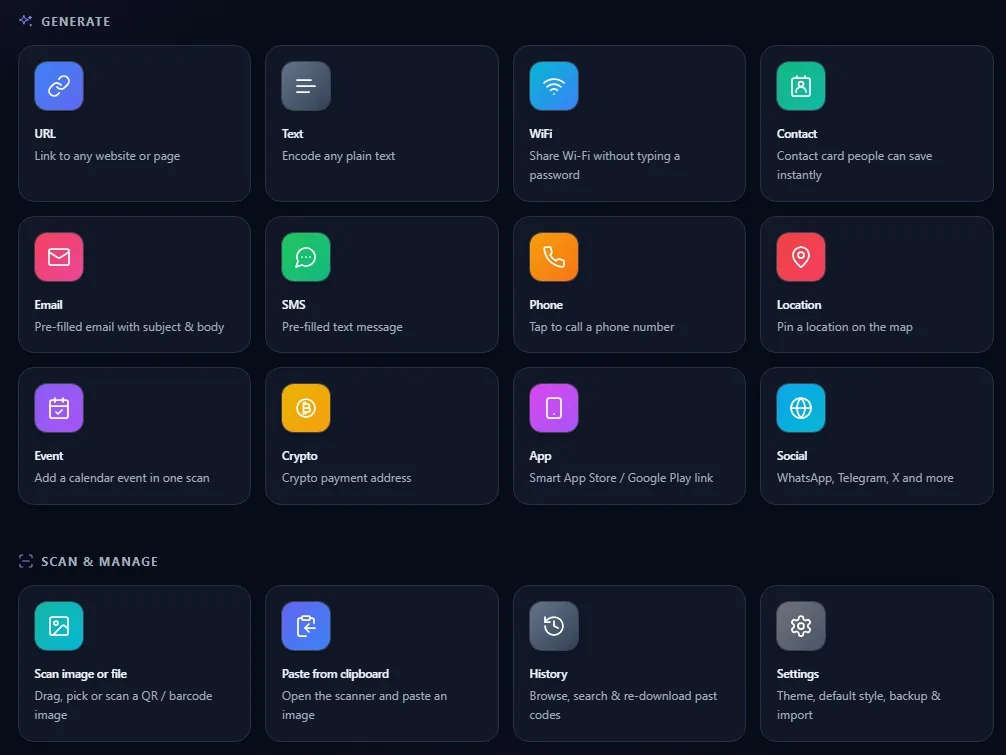
The QR Studio tools hub listing twelve generator tiles and four scan-and-manage tiles

Everything in one hub

All twelve generators plus the scanning and management tools: scan an image or file, paste from the clipboard, browse and re-download your history, and set your default style, theme and backups.

Permissions

Five permissions, each with a reason

QR Studio asks for no host permissions and no camera access. Here is exactly what each permission is used for.

PermissionWhat it is used for
activeTabReads the current tab's URL — only while the popup is open — so the QR code for the page you're on is ready immediately. It is also what lets the visible tab be captured when you choose full-page scanning.
contextMenusAdds the right-click entries: make a QR code for this page, this link or the text you selected, and scan a QR code inside an image you right-clicked.
storageSaves your history, style templates and settings in the browser's local extension storage so they survive a restart.
unlimitedStorageRaises the size limit on that same local storage. QR thumbnails and embedded logos are images, and the default quota fills up fast; this grants no extra access, only more room.
scriptingShows a small overlay with the decoded value after you scan an image from the right-click menu. Injected only into the tab you acted on, only at that moment.

No host permissions, no tabs permission, no camera. The extension makes no network requests at all, so there is no remote code to audit and nothing to switch off.

Private because it never connects

This isn't a policy promise about how carefully we handle your data — there is no server for your data to reach. Wi-Fi passwords, contact cards and crypto addresses are encoded by JavaScript running in your own browser, and the result never leaves it.

Read the full privacy policy
  • Zero network requests
  • No account, ever
  • No analytics or telemetry
  • History stays on your device

Guides

How to do the things people actually need

Short, practical walkthroughs — with the honest limits of the usual approach spelled out first.

FAQ

Questions worth asking before you install

Short answers. If yours isn't here, the support page has more, and email always works.

Make your first QR code in about ten seconds

Install it, press Alt+Shift+Q, and the page you're reading is already a downloadable QR code.

Free forever · No account · No data leaves your browser